When a piece sells
A sale is three taps: mark the piece sold (and off your shops), record where it is going, and let the inventory banner do the arithmetic.
-
STEP 1Mark it sold
Open the piece and tap Sold under STATUS. If it is listed anywhere, the Mark as Sold sheet asks How many sold? and offers Remove from all marketplaces, which takes the listing down on Etsy and deletes social posts in the same step. The available quantity drops by what you sold.
Sold in person or through Etsy directly? The app does not yet learn about Etsy sales on its own, so mark it here and the inventory stays honest.
-
STEP 2Ship it
A sold piece shows Manage Shipping. Enter the buyer’s address and the tracking number and tap Save Shipping Info. Saving a tracking number moves the piece to Shipped.
-
STEP 3Read the numbers
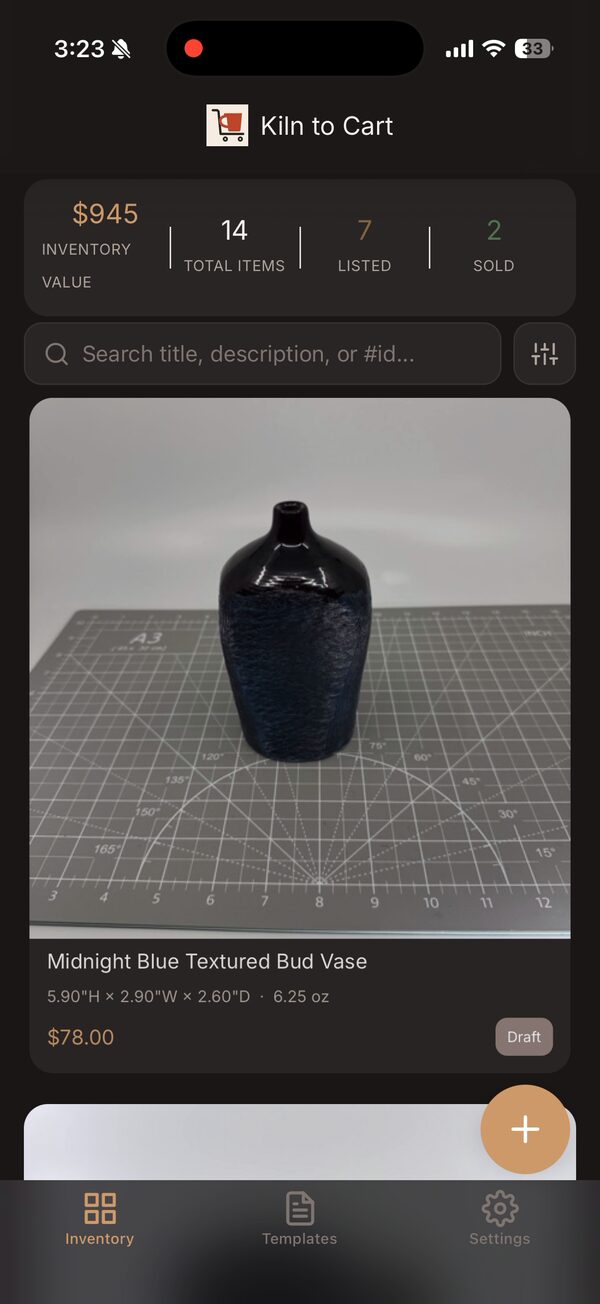
The banner at the top of Inventory shows inventory value, total items, listed and sold. The filter chips (Draft, Listed, Sold, Shipped) narrow the grid, and the table view lays every piece out with status, price and dimensions.
-
STEP 4Quick actions from the grid
Long-press any piece in Inventory for Move to Draft, Mark as Listed, Mark as Sold, Edit and Post without opening it.
Good to know
I marked the wrong piece sold.
Long-press it and choose Move to Draft or Mark as Listed. A removed Etsy listing has to be posted again, though.
Anything else?
Email support@kilntocart.com — it reaches a person.