Post a piece to Etsy
The whole point of the app: a piece you photographed ten minutes ago becomes an Etsy listing with its photos, description, price, shipping profile and attributes already filled in. The first time takes a few minutes because you connect the shop and choose defaults. After that, posting is one tap and a quick read.
-
STEP 1Connect your shop once
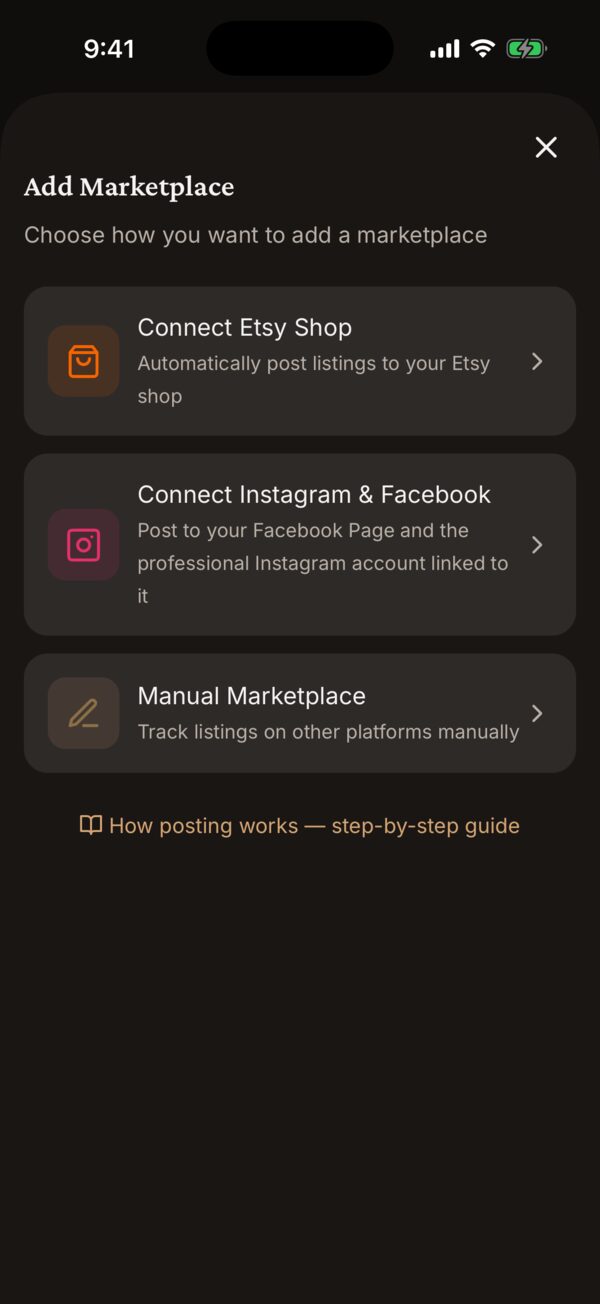
Go to Settings → Marketplaces → Manage Marketplaces and tap Connect Etsy Shop. Etsy’s own sign-in page opens in a sheet; approve the connection and you land back in the app with your shop listed by name. We never see your Etsy password — Etsy hands the app a token it can revoke any time from your Etsy account settings.
-
STEP 2Set your shop defaults
Tap the shop card to open its page. Choose a Default Listing State (Draft lands each post in your Etsy drafts for a last look on Etsy; Active makes it live the moment you post), then your usual Shop Section, Shipping Profile, Return Policy, Who Made It, What Is It, When Made and Processing Profile. Every post starts from these and you can change any of them per piece.
Start with Draft. Post two or three pieces, open them on Etsy, and switch to Active once you trust what arrives.
-
STEP 3Open the piece and tap Post to Marketplace
From Inventory, tap the piece and then Post to Marketplace. (Long-pressing a piece in Inventory and choosing Post gets you to the same place.) Pick your Etsy shop from the list.
-
STEP 4Read the review sheet
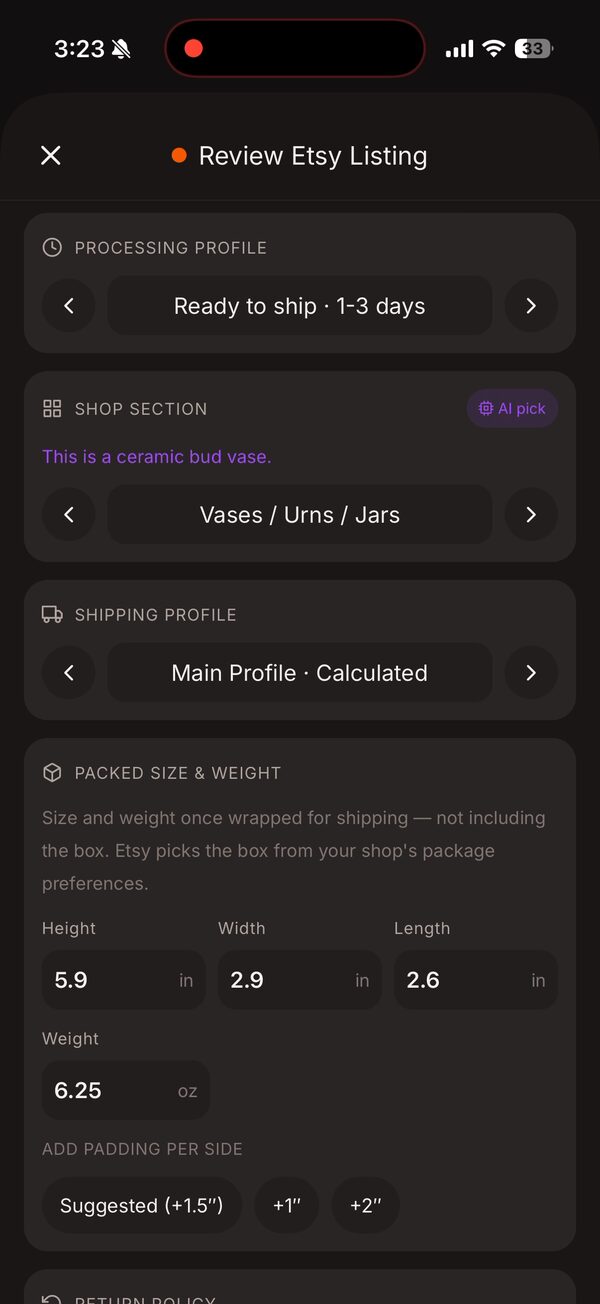
Review Etsy Listing is everything Etsy will receive. Check the quantity. Packed Size & Weight is the piece once wrapped, not the box — tap a padding chip (Suggested, +1″, +2″) and Save standard to remember your padding for next time. The Shop Section shows an AI pick with its reason; the Shipping Profile, Return Policy and Processing Profile come from your defaults. Scroll through and change anything with the arrows.
-
STEP 5Check the attributes and tap Post to Etsy
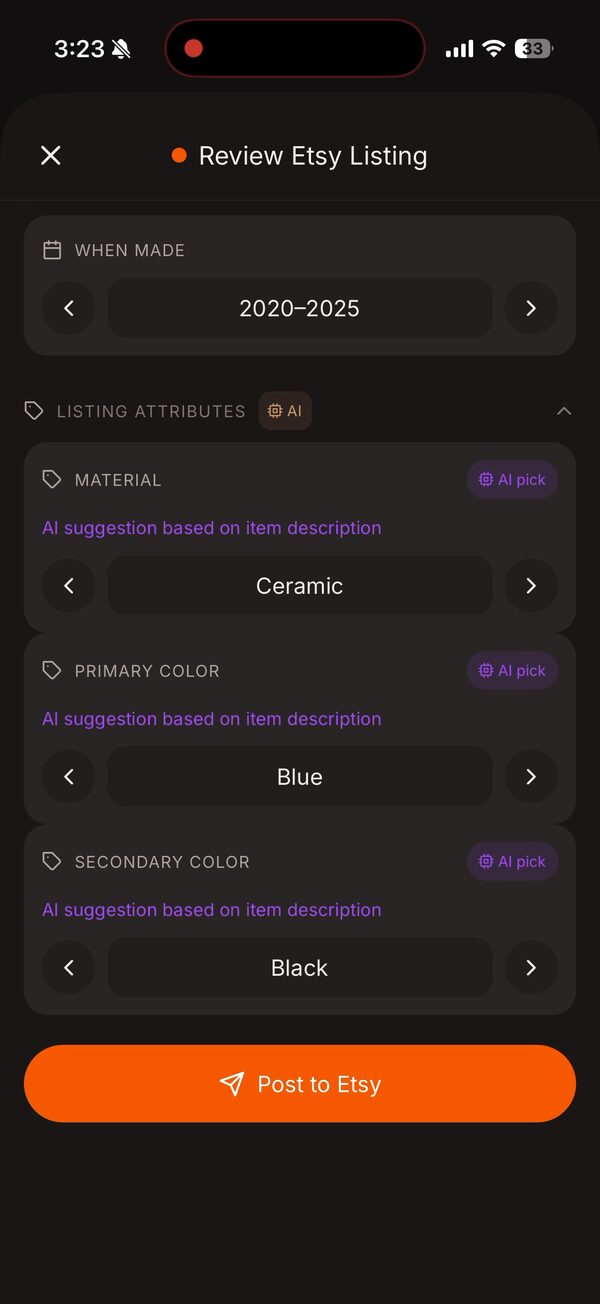
Under Listing Attributes the material and colours are picked from the description — correct any that miss. Then tap Post to Etsy. The photos upload in the order they appear on the piece, the Piece ID (if you use one) becomes the Etsy SKU, the attributes go with the listing, and the piece’s status flips to Listed.
No price set? The sheet warns you. Etsy needs a price, so add one on the piece first.
-
STEP 6Afterwards: the piece knows where it lives
The piece page now shows a LISTED ON section with a status dot per shop. Tap the listing for Listing Options: Edit on Etsy (opens Etsy’s listing editor), View on Etsy, Copy Listing URL, Hide Listing / Show Listing, and Remove Listing. Add Another Marketplace posts the same piece to Instagram or Facebook.
Edits you make to the piece in the app after posting do not flow to Etsy. Use Edit on Etsy for changes to a live listing.
Good to know
It says the piece is already actively listed there.
The shop already has an active listing for this piece. Open it under LISTED ON and hide or remove it first, or post to a different shop.
I listed pieces on Etsy before I had the app.
On the shop’s page tap Relink Listings. It matches your Etsy listings to pieces by SKU (the Piece ID) first, then by title, and links them so the piece page shows them under LISTED ON.
Can I post to more than one Etsy shop?
Yes — connect each shop and mark one as primary. The Post to Marketplace list shows every connected shop.
Anything else?
Email support@kilntocart.com — it reaches a person.